
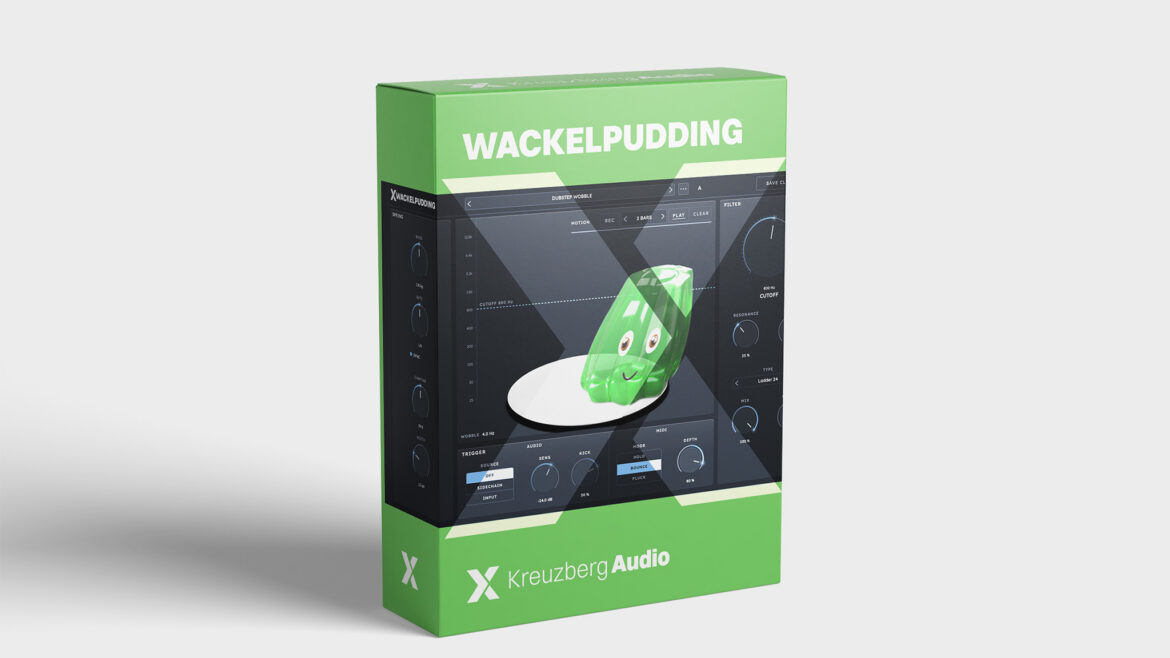
A filter with mass. Pull the pudding, let go, and your bass keeps wobbling.
An LFO always wobbles the same way
For a wobble bass you put an LFO on the cutoff, set it to eighths, and after two bars you have heard what it will do for the next forty. It runs like a metronome. What sounds alive is something else: a hit that overshoots, springs back and settles, and the next hit landing right in the middle of that motion.
So you build it by hand: an envelope on the cutoff, a second LFO for the swing, retrigger on every note, automation drawn for each drop. An hour later it wobbles, and the second drop wobbles exactly like the first.
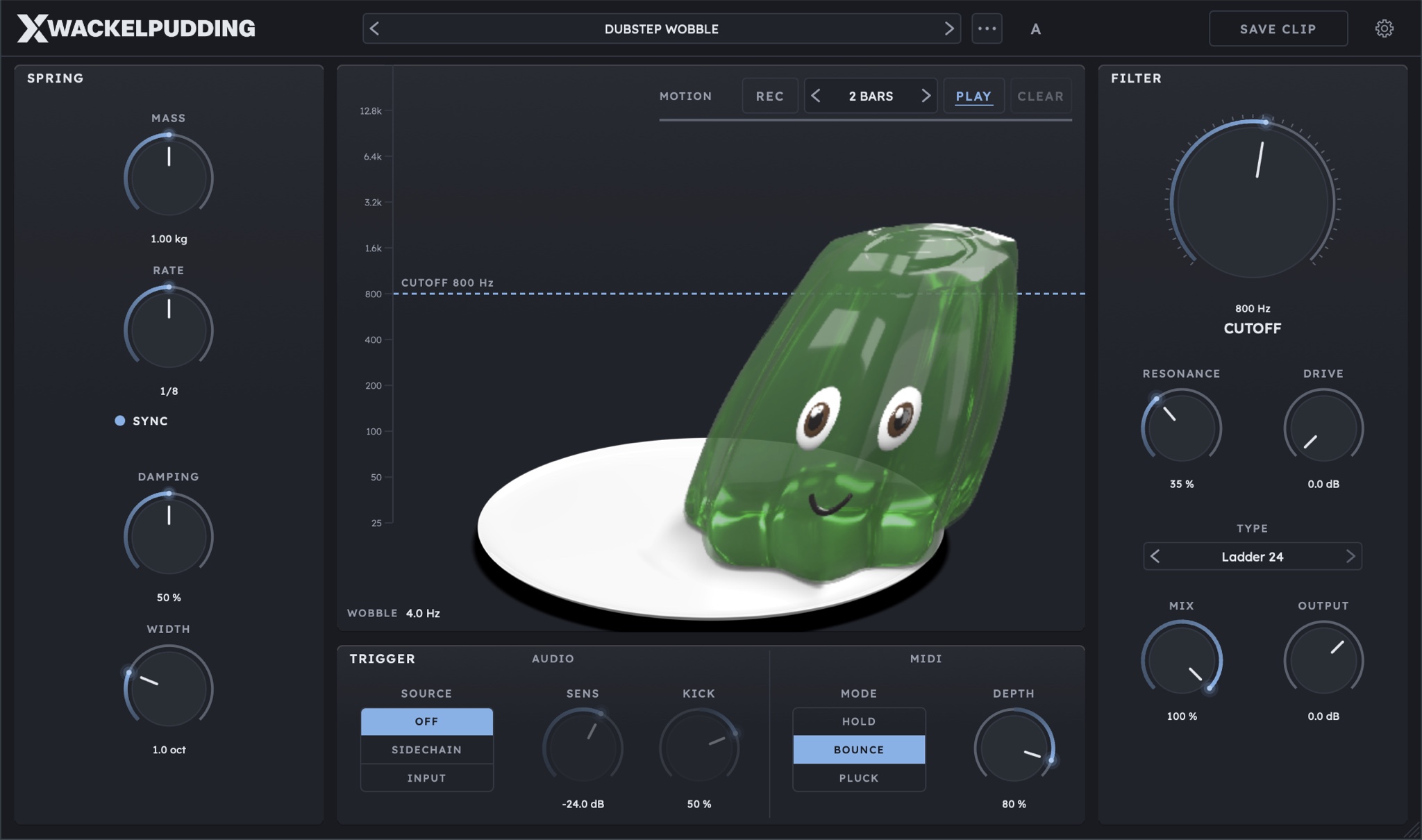
WACKELPUDDING hangs the cutoff on a spring with weight. In the middle of the plugin sits a pudding on a plate, and whatever the pudding does, the filter does.
A filter with mass
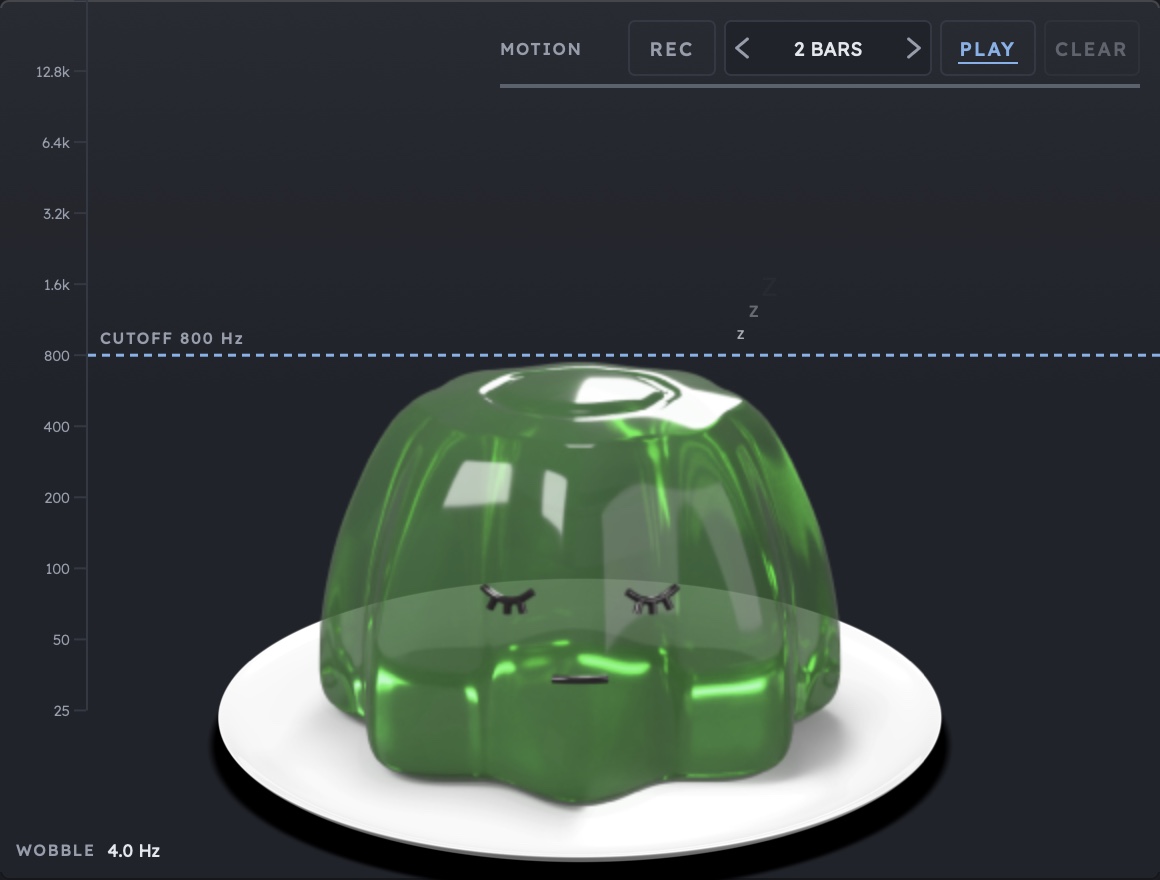
CUTOFF is the resting point. Hanging from it is a simulated spring with a weight from 0.1 to 10 kg. When something knocks the cutoff, it overshoots, swings back and wobbles out, like a pudding you shake. A heavy pudding swings slow and fat, a light one fidgets. The spring runs in the audio thread, step by step, with no LFO and no envelope.
WACKELPUDDING is not an LFO with a face, and not an envelope filter with a cartoon. At every moment the spring knows where the pudding is and how fast it is moving. If the next hit lands while it is still swinging, the hit adds to the motion. That is why no boing sounds like the one before, even when you hit it the same way every time. A filter that has mass, that you pull with your mouse, and whose motion you record as a loop: we have not seen that in any plugin before.
Tune the spring
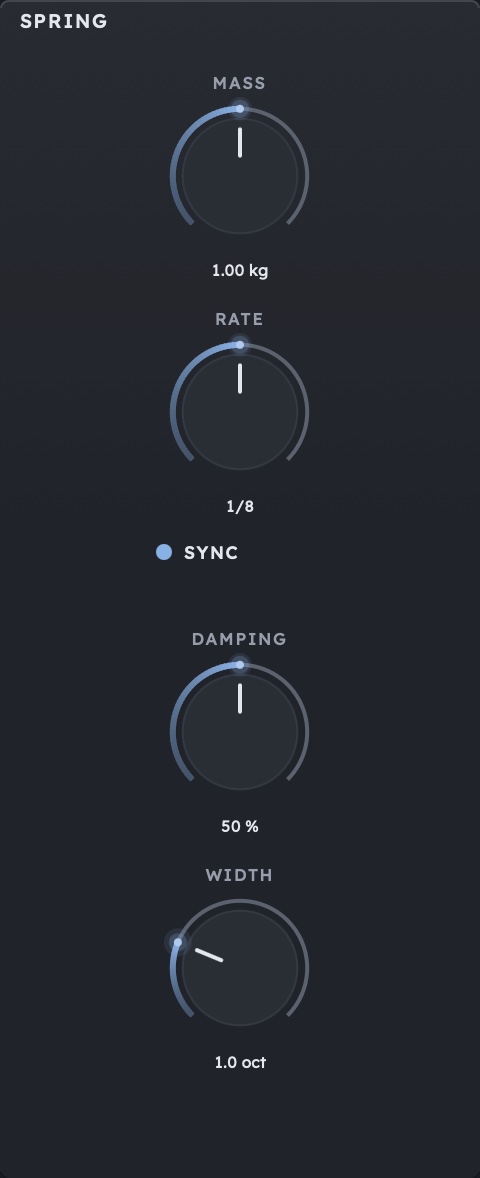
- MASS: how heavy the pudding is. Heavy sounds lazy and fat, light sounds nervous.
- STIFFNESS: how tight the spring is. Turn it right for a faster wobble.
- SYNC and RATE: SYNC locks the wobble to your DAW's tempo, RATE picks the note value from 1/1 to 1/32T and takes the place of STIFFNESS. The dubstep wobble on eighths sits in time with no maths.
- DAMPING: how fast the wobble dies down. Little damping rings on for a long time, lots of damping gives a short, dry shove.
- WIDTH: when the pudding tips to the side, the cutoff goes up on one channel and down on the other, up to 4 octaves apart. A sideways move becomes a stereo slap.
WOBBLE, bottom left on the stage, shows how fast the pudding is swinging right now, for example 4.0 Hz for eighths at 120 BPM.
Pull it, let go
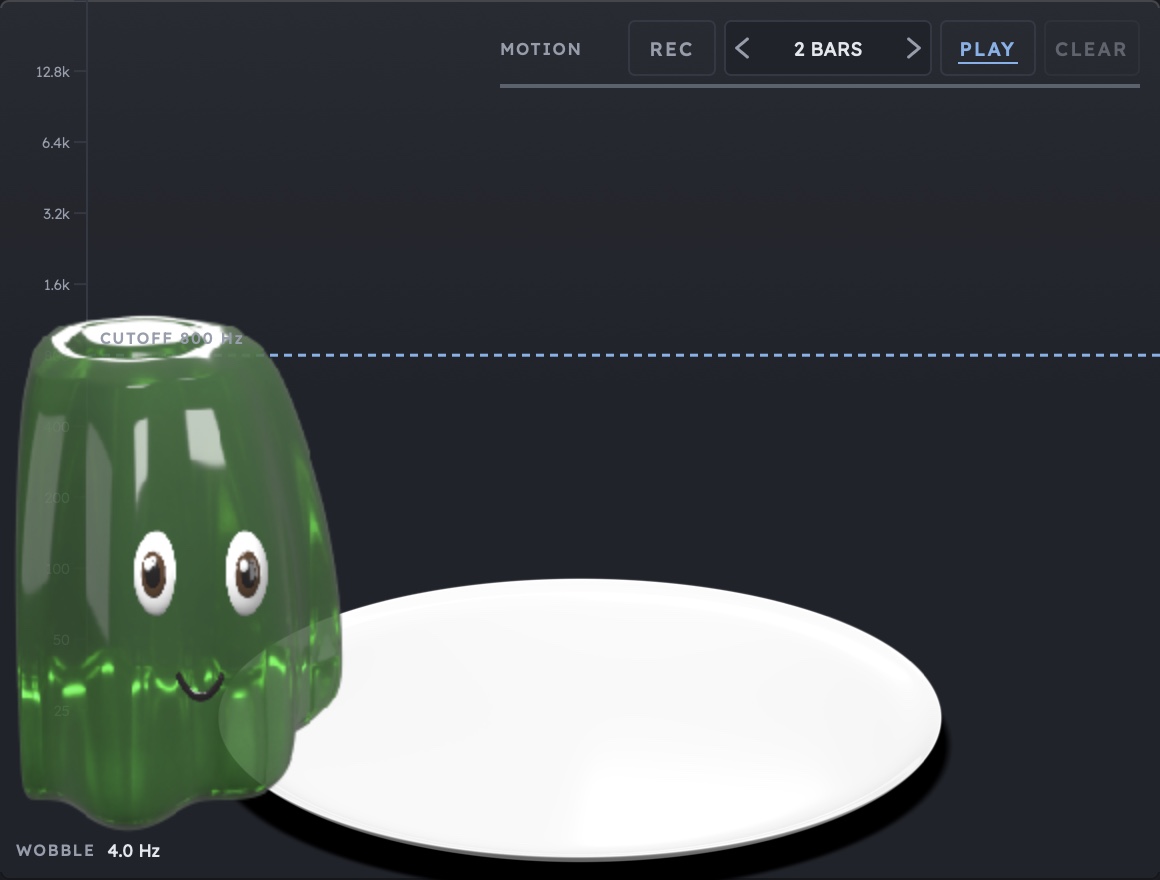
Grab the pudding with your mouse and pull. Up or down moves the cutoff by up to 5 octaves, sideways pulls it towards the wall. Let go and it snaps back. What you see and what you hear is the same motion: the boing on screen is the boing in the filter.
Throw it hard to the side and it splats against the wall, sticks for a quarter of a second and comes loose again. The dashed CUTOFF line can be dragged as well. PULL can be automated, so you can write the grab into your DAW too.
Kick, note, or both
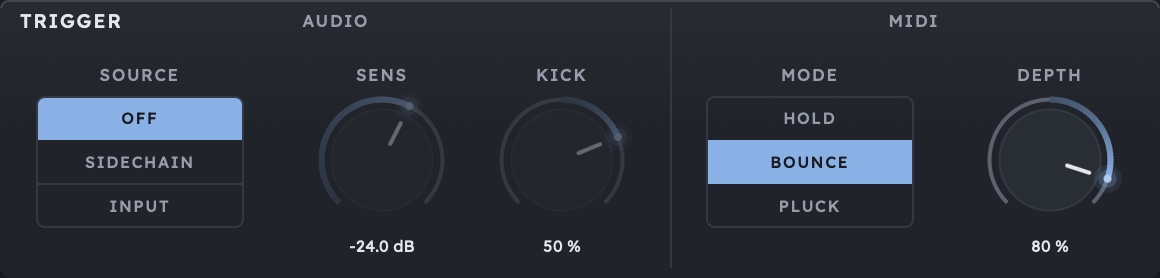
Besides your mouse, two things can knock the pudding, and both can do it at the same time.
- AUDIO, kick on the sidechain: SOURCE on SIDECHAIN, the kick into the sidechain input, and every kick gives the bass a shove that swings out until the next one. SENS sets the level at which a hit counts, KICK how hard it pushes and in which direction.
- AUDIO, the track itself: SOURCE on INPUT, and the break on the track knocks the filter by itself. Every snare turns into a little wobble.
- MIDI, HOLD: the note holds the pudding as long as it plays. Release it and you get the boing. Short notes on eighths, and the bass springs back after every note.
- MIDI, BOUNCE: the note moves the pudding to a new resting point, and it bounces there as long as the note plays. After the last note it swings back to CUTOFF. That is how you write a wobble as a MIDI clip, right on the grid.
- MIDI, PLUCK: every note plucks the pudding once, harder with higher velocity. Notes struck together add up. A sixteenth line with changing velocity, and the filter dances.
DEPTH sets how far a note moves the cutoff, up to 5 octaves, up or down. Soft notes move it less. MIDI notes act sample-accurately, so the boings land exactly on the grid.
Your hand as a loop
MOTION sits at the top right of the stage. REC records how you move the pudding, for 1, 2, 4 or 8 bars, from the next bar line. Then WACKELPUDDING plays the motion back as a loop, in time with the song.
It records your hand, not the path of the pudding. The spring computes every pass anew, so MASS, STIFFNESS and DAMPING keep shaping the motion. Record two bars of pulling and throwing in the breakdown, then turn MASS up: the same hand now sounds heavy and lazy. Kicks and MIDI notes keep knocking on top.
The loop follows the song position. After a jump, after stopping and after reopening the project it sits on the same bars, and a bounce sounds like playback. Grab the pudding while the loop runs and your hand wins; let go and the loop takes over at the matching point.
The filter behind the pudding
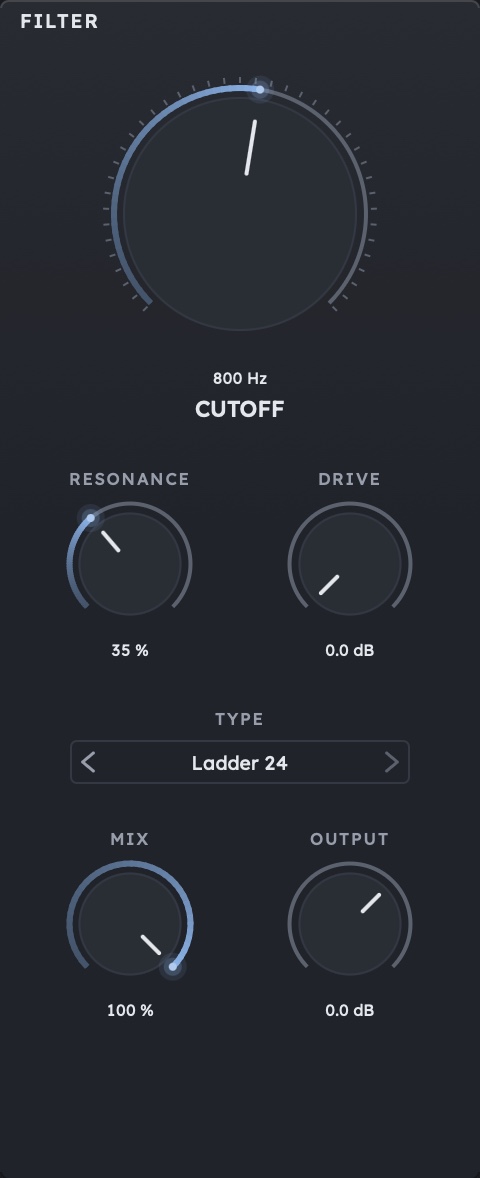
Under the pudding works a filter with four types:
- Ladder 24: 24 dB per octave, the type for basses. DRIVE saturates it with up to 24 dB and gives the wobble bite.
- LP 12: a soft lowpass for leads, pads and chords that should stay open.
- BP 12: a bandpass for talking wobbles, vocal chops and percussion.
- HP 12: a highpass for drums and builds. The pudding pulls the bass out in time and lets it back in.
RESONANCE makes the sound sharper and the pudding firmer, and you can see it: it turns from pale through green and orange to red. MIX blends dry and filtered, OUTPUT sets the level after it.
18 factory presets, ten of them in motion
Eight presets are starting points for sounds: INIT, DUBSTEP WOBBLE, KICK BOUNCE, SLOW JELLY, STEREO SLAP, RESONANT GLASS, LAZY BASS and GROWL. Ten more come with a finished motion loop and start it when they load: HEARTBEAT, PING PONG, DRUNK WALK, EARTHQUAKE, FLICK FLICK, SLINGSHOT, ELEVATOR, SEASICK, HICCUP and JELLY DRUMMER. Every preset brings its own MIDI mode.
A/B compares two settings, and each side keeps its own loop. Your own presets save the recorded motion too and go into your Documents folder.
A reel straight from the plugin
WACKELPUDDING always keeps the last two minutes, the sound and the motion of the pudding, even with the window closed. When something just sounded good, SAVE CLIP turns it into a finished portrait video for Instagram, TikTok or YouTube Shorts, 3 to 90 seconds long. In the picture: the pudding large on its plate, the hand while you pull, and the cutoff. No screen recording, no editing.
Technical highlights
- Spring simulation with a mass from 0.1 to 10 kg, stiffness and damping, two axes for height and stereo
- SYNC to the host tempo, RATE from 1/1 to 1/32T
- PULL up to 5 octaves, sideways to the wall, automatable
- WIDTH: stereo offset up to 4 octaves
- Filter types LP 12, BP 12, HP 12 and Ladder 24, DRIVE up to 24 dB for Ladder 24
- Trigger from the sidechain or the track's own signal, SENS from minus 60 to 0 dB
- MIDI modes HOLD, BOUNCE and PLUCK, sample-accurate, DEPTH up to 5 octaves, with velocity
- MOTION loop over 1, 2, 4 or 8 bars, follows the song position
- 18 factory presets, ten of them with motion, A/B comparison
- Oversampling off, 2x or 4x, the latency is reported to your DAW
- Clip export as MP4 in 1080 x 1920, 60 fps, H.264 and AAC
- Interface from 50 to 150%, dark and light theme
- No network access
Formats & Systems
Formats: VST3, AU (macOS), CLAP, standalone
Systems: macOS 11 Big Sur or newer (Universal Binary, Intel and Apple Silicon), Windows 10+ (64-bit), Linux x86_64 from Ubuntu 22.04 (VST3, CLAP, Standalone)
Video export: macOS and Windows, not on Linux
The kick comes in on the sidechain input, MIDI notes from a MIDI track routed to WACKELPUDDING.
Made in Berlin
WACKELPUDDING was developed entirely in Berlin. The DSP is based on JUCE, while the spring simulation, the filter and the stage are written from scratch, and the pudding is our own 3D model, rendered in Blender. No white label, no generic toolkit filter. Our secret weapon is the joy of detail.
Tools by producers, for producers.
Free download
WACKELPUDDING is free, for commercial productions too. No serial number, no activation, no demo limits: download, install, pull. The plugin never goes online and sends nothing; presets, settings and clips stay on your computer.
Price: free download