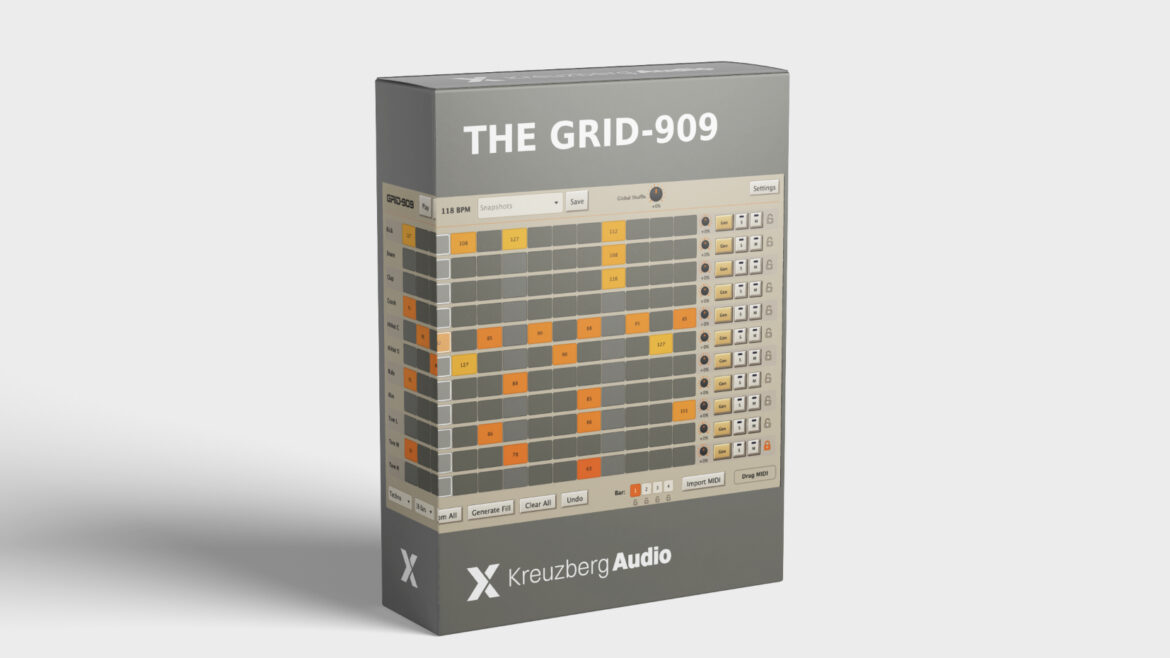
Think of a living preset bank. One that doesn't just store sounds, but patterns, ready-to-use 909 grooves you can combine, tear apart and develop further in seconds. That's Grid-909.
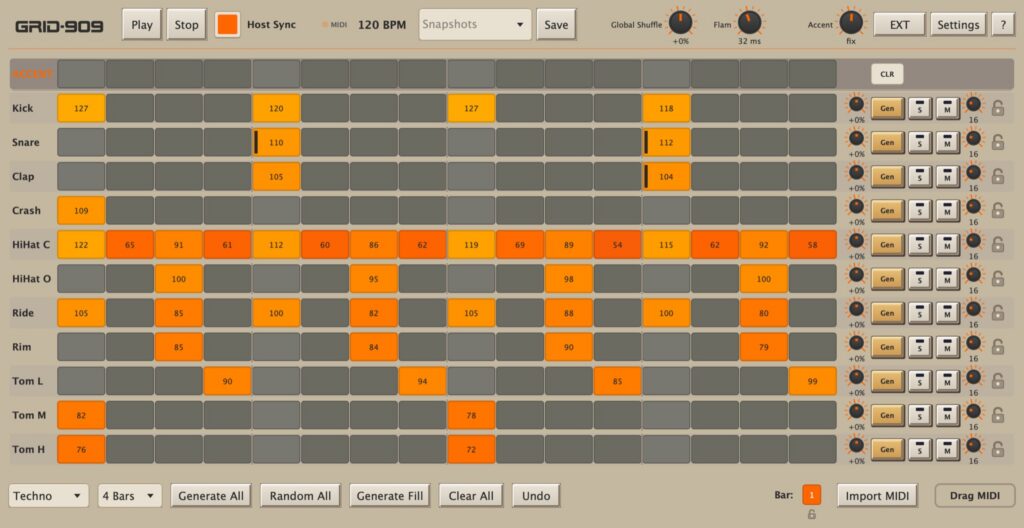
160 Pattern Sets. 8 Genres. One click.
Grid 909 ships with 160 ready-made drum pattern sets across 8 genres: House, Techno, Electro, Trance, Breakbeat, Acid House, R&B and UK Garage. Each genre delivers 20 patterns per drum instrument, all built by the rules that define the genre. Four-on-the-floor kick for House, industrial mechanics for Techno, syncopated broken beats for Breakbeat. Genre-authentic, not randomly thrown together.
Instead of staring at an empty grid, you hit Generate and have a working groove. From there, you decide what stays and what changes.
The key trick: each of the 11 drum tracks has its own Generate button. Kick is working, snare is fine, but the closed hi-hat needs something different? One click. Only that track gets a new pattern from the library, everything else stays untouched. Within minutes you have a combination that no single pattern in the library knows, but still sounds like someone built it who knows what they're doing.
Few Controls. Real Impact.
Shuffle is bipolar. -50% to +50%, global or per drum track. That means: kick behind the grid, hi-hat ahead, snare straight. Anyone who's tried to dial in that pocket by hand in a DAW knows what that's worth.
Velocity is edited right in the grid, with a drag up or down. No menu, no popup. Drag a step sideways and it moves along its row, velocity included, so a clap slides a sixteenth later without setting it again. Kits with free velocity add a downbeat boost: every quarter note automatically gets a little more weight, which makes the groove earthier without you touching anything.
Add fill patterns per genre, a snapshot system for saving complete pattern states, and up to 64 undo steps. Take a groove apart and lose your way back: no problem.
One length per drum. Polyrhythms included.
Every drum row gets its own LEN knob, 1 to 64 steps. Set the kick to 16, the snare to 9, the closed hat to 3, and you're not writing a pattern anymore, you're writing a polyrhythmic constellation that drifts across multiple bars and only realigns when the math says so. The playhead in each row follows its own cycle length and no longer snaps back at every bar end. What you see is exactly what you hear.
A click on the LEN knob sets it back to 16, a double-click on the number below opens a field to type the length. If you don't need the feature, you won't notice it. Use it once and you know no classic step sequencer delivers it like this.
Chords on a second lane.
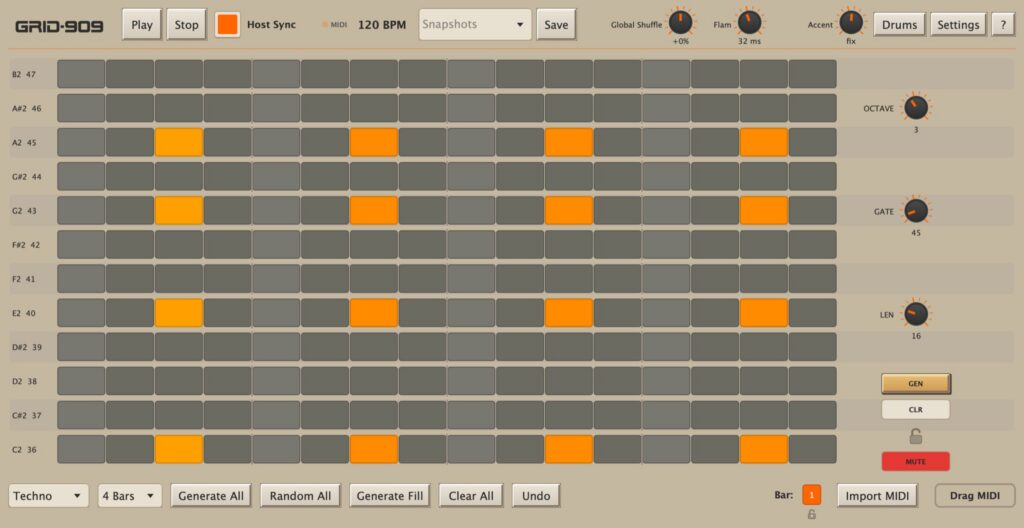
The original 909 had an External Instrument mode: a second track per pattern that only goes out over MIDI. Set several notes on one step and you got a chord. Grid 909 brings this track into the plugin and gives it a grid of its own.
A click on EXT shows the External Instrument Lane: twelve chromatic note rows, and several rows on one step make a chord. The lane sends on its own MIDI channel, which you set in the Ext row of the Settings tab, and has its own loop length from 1 to 64 steps. OCTAVE moves it across nine octaves, GATE sets the note length from 10 to 400 percent of a step. That way Grid 909 plays the chords for a synth or a piano right next to the drums.
Generate All and Random All fill the lane with chord progressions that fit the genre, based on research into the harmony of the eight genres. GEN rolls only the chords, the lock protects a progression you set by hand, and CLR clears the lane in one click. Undo, snapshots, MIDI export and MIDI import all include it. A new instance starts with the chord lane muted, so no chords run into a drum plugin that listens on every channel before you want them to. Switch MUTE off and they play.
Accent like the original.
The original 909 knew two kinds of accent: a Total Accent track that lifts every instrument on a step together, and an accent per voice. Grid 909 has both. An ACCENT row sits above the grid, a click sets the accent on a step, and it lifts the chord lane too.
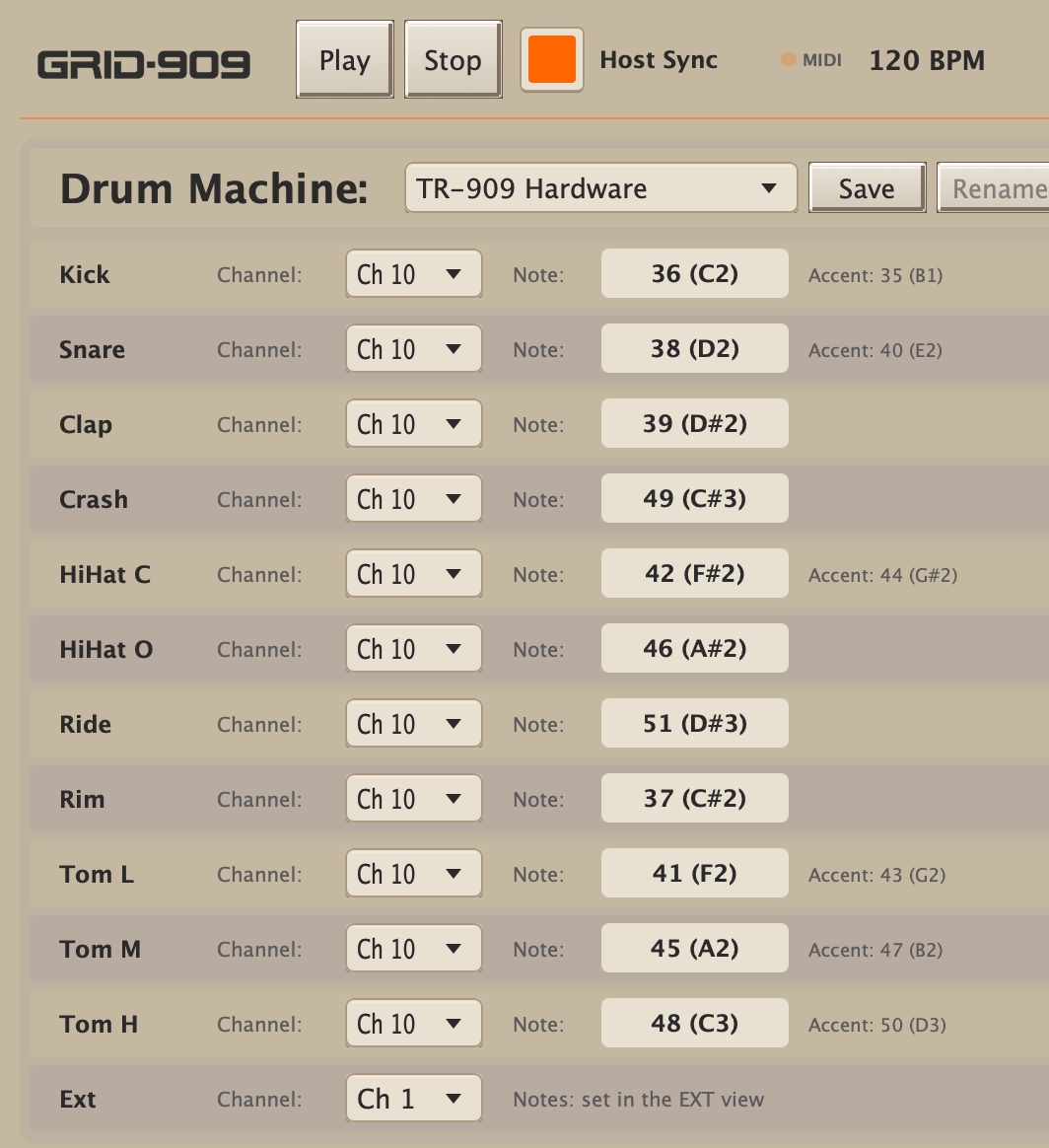
How the accent reaches your instrument depends on the kit. With free velocity, the ACCENT knob in the header adds its value to the velocity, from 0 to 63. The two new kits send fixed levels so the target recognizes them, and you set the strength there. Roland Cloud TR-909 (Accent) sends 50 without accent, 80 with one of the two accents and 110 with both. TR-909 Hardware talks like the original machine, with 64 or 96, and accented hits on kick, snare, closed hat and toms go out on their own accent note, the kick on 35 instead of 36, for example. In both kits, a hit from velocity 100 up counts as an accent on its own voice. The Settings tab shows which profile is active next to the kit selector, and the accent note next to each drum.
Flams like on the 909.
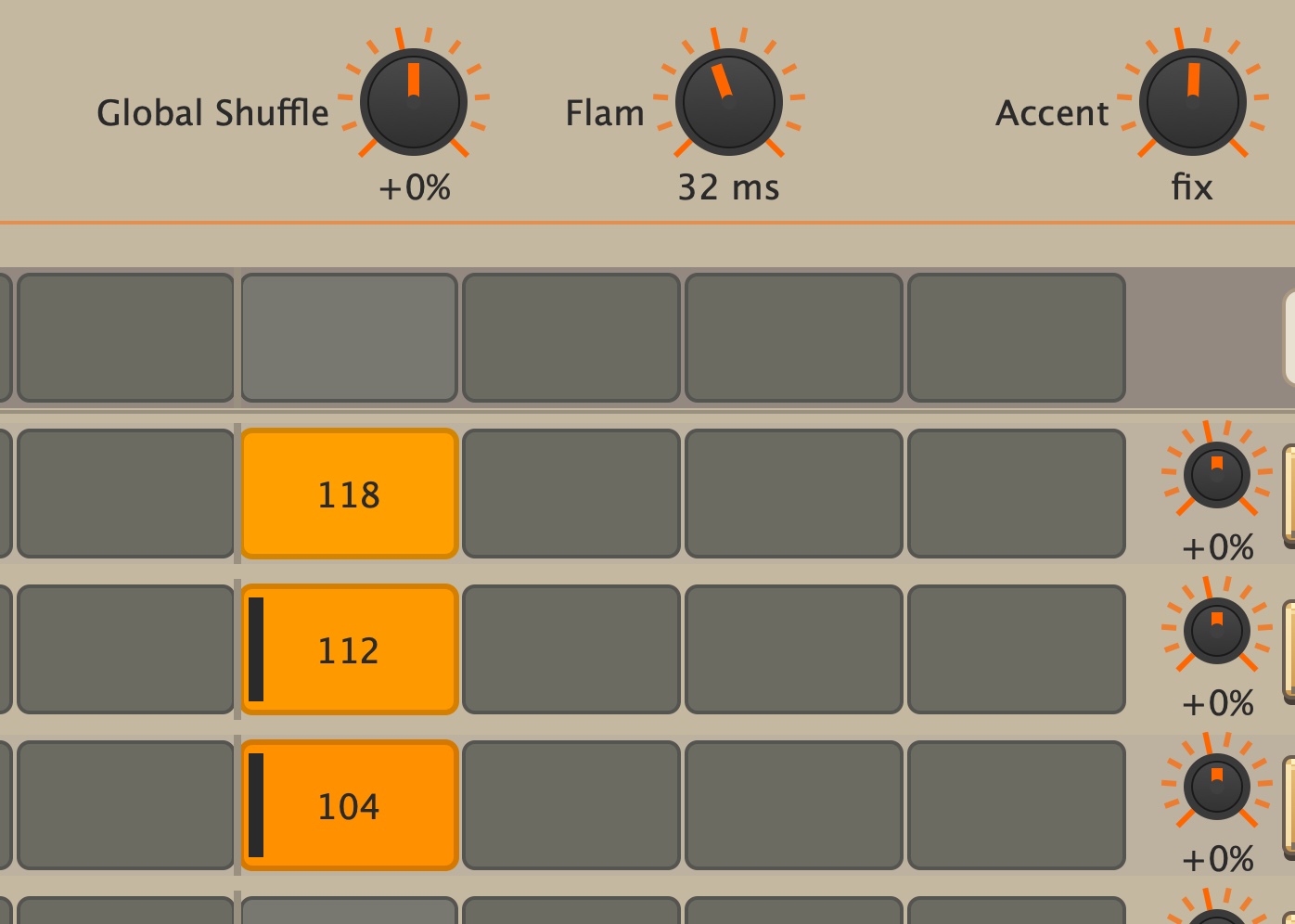
A flam puts a quiet grace note just before the hit. On the snare and clap of the backbeat the hit gets thicker, and a few flams on the toms make a fill roll.
Grid 909 sets flams per step, on all 11 drums, and a thin strip on the left edge shows where one sits. The FLAM knob in the header sets the spacing for all drums, in eight steps from 20 to 48 ms, 32 ms by default. Flams play live, end up in the MIDI export, are saved with the project and in snapshots, and undo takes them back.
Not Just for 909 Sounds.
Grid-909 produces MIDI only. No audio, no built-in sounds. That means it drives any drum machine, sampler or drum plugin that understands MIDI.
The Settings tab exposes the full MIDI mapping. Ready-made kits for Bitwig V9 Pro, Audiorealism ADM1x, D16 Drumazon 2, Roland Cloud TR-909 and Roland Cloud TR-909 (Accent) are included, plus TR-909 Hardware with the note map of the original machine. Using something else? Select Custom and enter the MIDI notes directly. Each of the 11 drum tracks also gets its own MIDI channel, anyone running multiple drum plugins in parallel or needing complex routing has full flexibility to do so.
Custom mappings are no longer a dead end: save them as named Custom Kits and recall them from the dropdown whenever you need them. Save, Rename, Delete right next to the Machine selector. Kits are stored as JSON in your user folder and travel with you across projects. They keep the channel of the chord lane too.
From Grid 909 to your drums.
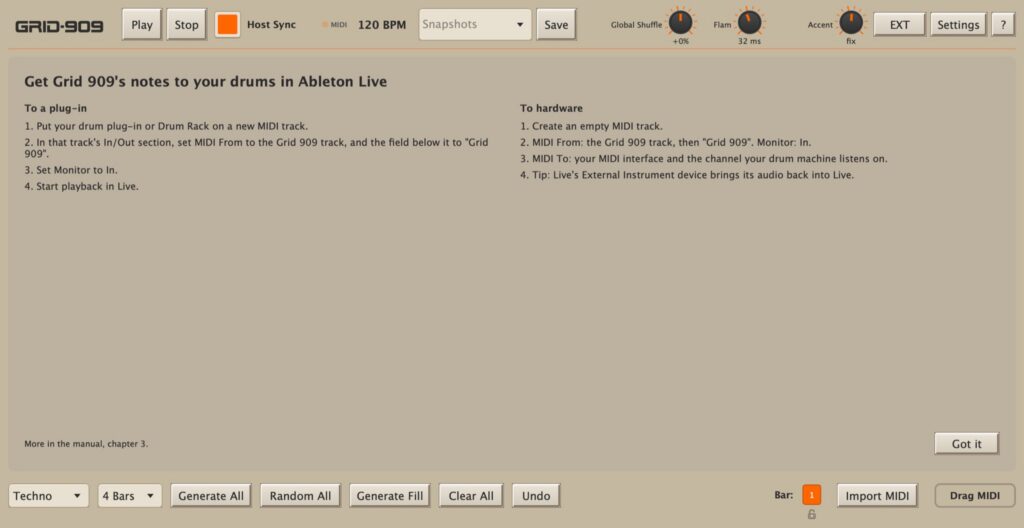
Grid 909 generates MIDI, so it has to reach the track your drum plugin sits on, and every DAW puts that cable somewhere else. The question mark button in the header shows the steps for the DAW Grid 909 is running in, one column for a drum plugin and one for hardware. The first time you open it in a new DAW, the guide shows up by itself. The MIDI light in the header lights up whenever Grid 909 sends notes, flams and chord lane included, so you see at a glance whether the notes leave the plugin.
Logic Pro and MainStage do not pass on the MIDI output of an instrument. There Grid 909 runs as an Audio Unit of its own, Grid 909 MIDI FX, in the MIDI FX slot of your drum track, and a keyboard on that track keeps playing the drum plugin. Project, snapshots, license and your own kits work in both versions.
Bring Patterns In or Take Them Out.
MIDI import via drag & drop: drop a .mid file from your DAW or hard drive onto the plugin, and the notes land in the grid automatically quantized. When you're done, drag the Drag MIDI button straight into your DAW, finished MIDI file, shuffle applied, all muted tracks excluded.
Multi-bar patterns up to 16 bars, page navigation, per-drum solo and mute, a lock system that excludes individual tracks or entire pages from generation, all there.
Who It's For.
For everyone who would rather make decisions when programming drums than place every step by hand. For producers who need a working groove fast and then want to step in precisely. And for everyone who already knows: the sound is in the groove, not the samples.
Try Before You Buy
The demo runs for three starts with the full feature set and mutes the MIDI for three seconds every minute. A start is one session in your DAW or in the standalone app. The plugin scan does not count, and several instances in one project count as one start. Enter your license key in the Settings tab and you're done.
Formats & Systems
Formats: VST3, AU (instrument and MIDI FX for Logic Pro and MainStage), CLAP, Standalone
Systems:
- macOS 11.0+ (Universal Binary, native on Apple Silicon)
- Windows 10 64-bit or newer
- Linux x86_64
Demo, 0,00 € Full version, 49 Euro Including 19% VAT
License Information
This product includes a professional license system with the following features:
- Online activation with hardware fingerprinting
- Up to 3 device activations included
- Automatic license delivery via email
- Customer portal for license management
After purchase, you will receive your license serial number via email within minutes.