
One curve across the spectrum. The bass stays mono, the top opens up.
One knob for the whole spectrum is not enough
Width is not a single number. The sub is a different job than the hihats, and yet a classic widener gives you exactly one knob for both. Turn it up and the entire spectrum comes along, including the frequencies where that is precisely the mistake.
So you stack: a mono maker underneath, an imager on top, a third instance for the mids. Three plugins, three windows, no shared view. And after all that work, nothing tells you whether your low end is actually mono or just almost. The goniometer shows you the sum, not the spectrum.
That is where it gets expensive. Anything out of phase down there goes missing on a club system, causes trouble at the cutting lathe and disappears in the mono downmix on every phone speaker. By the time anyone notices, the master is usually already out the door.
The idea: width gets drawn, not dialed
BREITSEITE replaces that one knob with a curve across the spectrum. It defines how wide the signal should get in every frequency band. Bass mono, mids under control, top open, in one move and in one window.
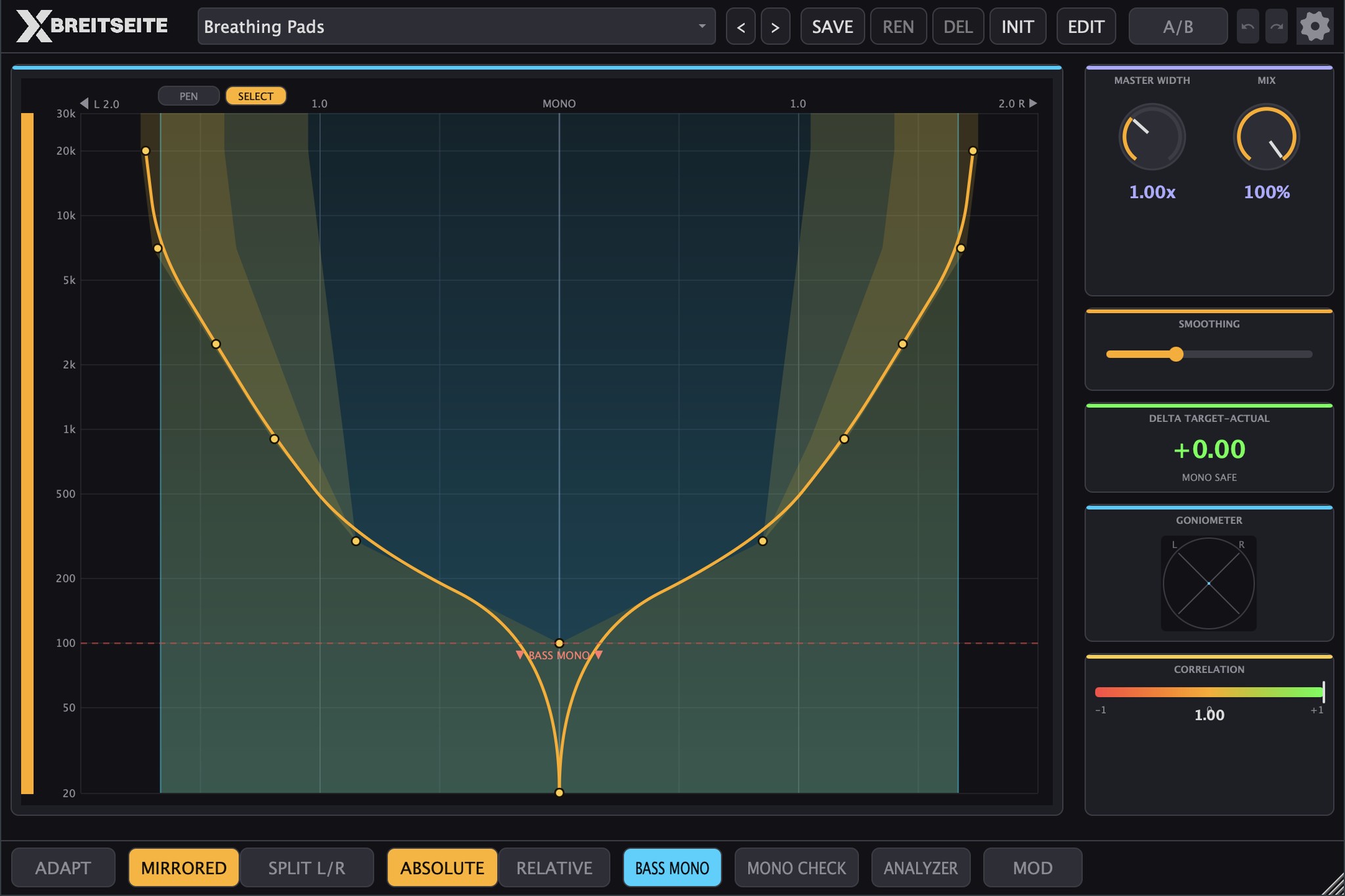
Amber is the curve you draw, cyan shows your material.
Behind the curve, an analyzer measures how wide your material already is in every band and where it carries out-of-phase content. You are not drawing blind. While you draw, you see where an edit is worth it and where you should leave well alone.
And the curve does not have to stand still. Every point on it can let its width breathe with its own LFO, locked to song tempo or running free.
Who BREITSEITE was developed for
BREITSEITE is developed for two ways of working that share the same view.
As a mastering engineer you get control over the low end that decides how a master holds up on vinyl and in the club. Correlation per frequency band instead of one summed readout, a click-free A/B with level matching, AUTO GAIN against the louder-sounds-better trap, a phase coherent dry path and a latency that stays constant and gets reported cleanly to your host. Club Safe and Vinyl Master are made exactly for this, set conservatively and ready to use without rework.
As a producer you get width as a creative tool. You open up the top and the pads without sacrificing the bass, and you let individual frequency ranges open and close in time with the track. ADAPT learns a starting curve from your material as it plays, so you do not begin at a flat line. And MASTER WIDTH scales the entire curve, movement included, from a single parameter you can automate when the drop needs to open up.
In the frequency domain, not with timing tricks
Most wideners work in the time domain. They shift timing, bend phase or turn a global mid/side ratio. It sounds wide, and the bill arrives in the mono downmix.
BREITSEITE goes the other way. A short time Fourier transform with a 2048 window and a hop of 512, which means 75 percent overlap, splits your signal into 1025 frequency bands, with a Hann window in both analysis and synthesis. In every band the plugin separates mid and side and multiplies only the side by the value of your curve: 0 makes the band mono, 1 leaves it untouched, 2 doubles its side content. No time offset between the channels, no allpass smearing, no artificial decorrelation waiting to blow up in your face later.
Which leads to the sentence that matters for your low end: as long as the left and right curves are identical, the mid signal is never touched. What reaches a mono system does not change. And because the side factor never goes negative, not even through movement, your stereo image cannot flip into reverse phase.
On top of that, constant Q smoothing keeps the curve musically soft across frequency instead of switching in hard steps, and an analyzer with frequency dependent time constants averages the bass more slowly than the top. That is exactly why the display sits still down in the basement, where it needs to sit still.
Target and material in the same picture
Amber is your target, cyan is your material. The cyan tree shows how wide the incoming signal already is in every band, and a faint amber veil fills the area where tree and curve pull apart.
The tree follows your material, not your curve. Think of it as the map: where it reaches far out, there is plenty of width already, and where it stays narrow, the material is close to mono. The result of your processing is what the goniometer shows you.
The correlation strip shows you what survives in mono
A narrow color strip on the far left carries 90 logarithmically spaced bands. It shows the phase correlation of your input signal per frequency band: green is in phase and mono safe, amber is uncorrelated and wide but harmless, red is out of phase.
Red in the bass is the warning that matters. Whatever runs out of phase down there goes missing on a club system and on vinyl, no matter how good it sounded on headphones. A wider curve will not fix that, a higher bass mono boundary will. Most wideners never tell you. This one does, while you are still drawing.
A/B and AUTO GAIN, so your ears do not get fooled
More side means more energy. On a full mix, MASTER WIDTH at 3.0 adds about 1.8 dB, and louder is reliably heard as better. That is where most stereo decisions go wrong: what wins in the end is not the better setting, it is the louder one.
BREITSEITE splits the problem across two tools. A/B crossfades to the original over 7 ms, delayed by the latency and matched in loudness to the processed signal, by up to 12 dB. It always compares against 100 percent original, wherever MIX happens to sit. Because A/B measures the sum of both channels for this, it evens out level differences in the mid, but not the gain that comes from extra width.
That part is handled by AUTO GAIN. It measures the power of both channels in the original and the processed signal over about 300 ms and pulls the processed signal down by the difference, by up to 12 dB, gliding over 50 ms so it never chases transients. It ships switched off, so existing projects keep their level. It is stored per instance with your project and can be automated.
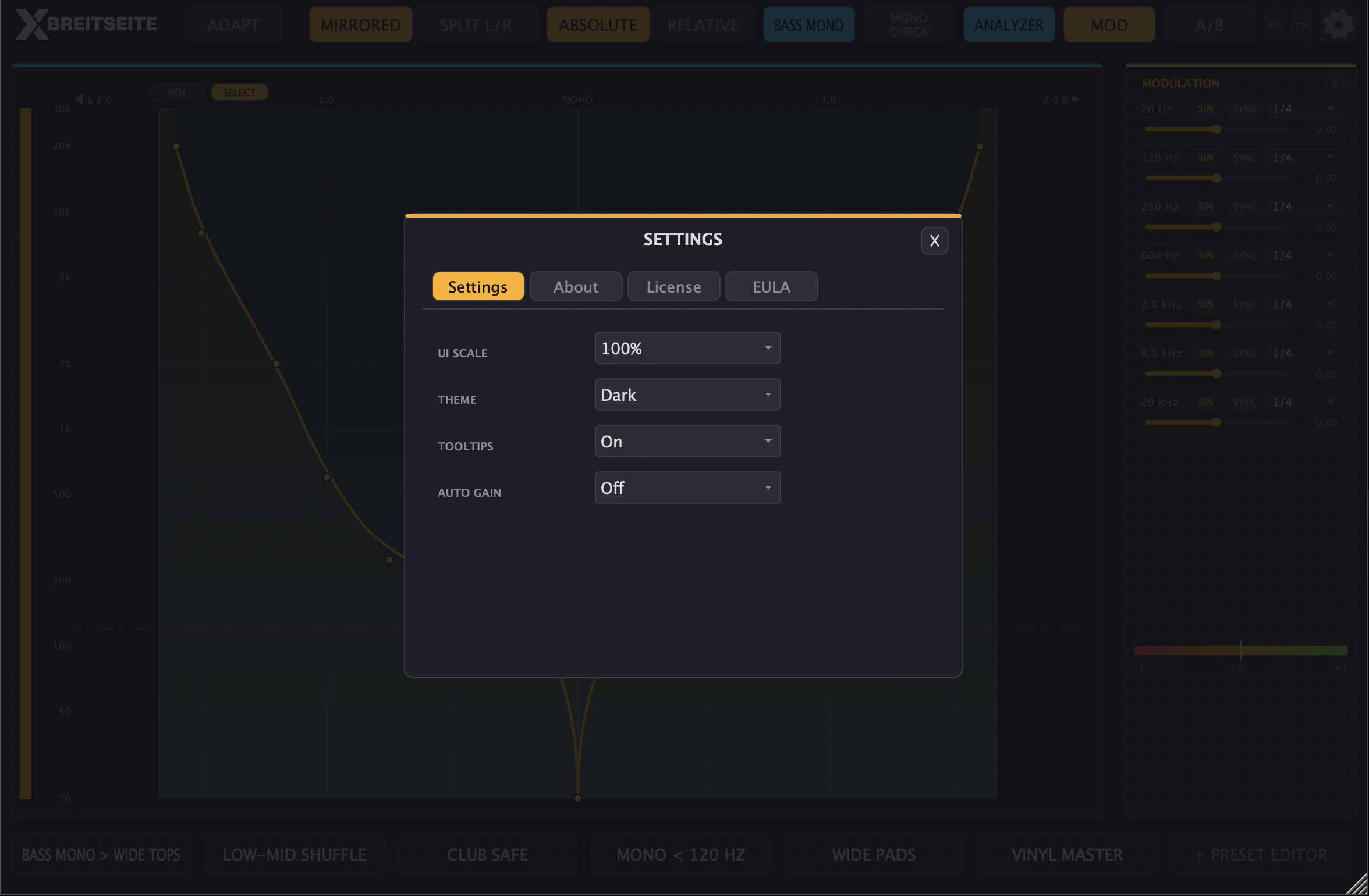
AUTO GAIN, theme, scaling and tooltips live in the SETTINGS.
For an honest comparison, switch AUTO GAIN on and flip with A/B. Not with your DAW bypass: that one jumps by the latency and keeps the loudness gain in play.
The editor runs vertically
The curve editor deliberately works differently from an EQ. Frequency runs vertically from 20 Hz to 30 kHz, width runs horizontally from the center axis outwards. Left of center is the curve for the left channel, right of center the one for the right. Unfamiliar for two minutes, and after that you will not want it any other way.
Two tools share the work. SELECT, the default, lets you add, move and delete individual points, so a stray stroke can never replace your curve. PEN lets you draw a stroke that becomes the new curve. With either one, a point below the bass mono boundary automatically gets a width of 0, so the mono zone cannot be pulled open by accident.
MIRRORED is the default and keeps both sides in sync. For asymmetric work you switch to SPLIT L/R and shape left and right independently. Undo and redo go back up to 64 steps.
ABSOLUTE or RELATIVE
In ABSOLUTE the curve you draw is the width itself, from mono at the center to double the side content at the edge. In RELATIVE one is added: the center line means unchanged and the edge means triple the side content. So RELATIVE can only open, never make anything narrower than the original. That is exactly what you want when you open up finished material without dropping below where it started anywhere. For narrowing, and for building a curve from scratch, use ABSOLUTE.
MASTER WIDTH then scales the entire curve from 0 to 3.0, which makes it a good single automation parameter, for instance to open the chorus by 0.1. Below 1.0 it narrows the whole image, in both modes.
ADAPT learns the curve from your material
With unfamiliar material you do not have to start at a flat line. Hit ADAPT, the label switches to LISTENING, and play a representative passage. The plugin holds on to the widest measurement in every frequency band.
Hit it again and it reads that shape at ten frequencies between 20 Hz and 20 kHz and turns it into a mirrored ten point curve, snapped to the bass mono zone. The whole operation is a single undo step.
ADAPT is a starting point, not a neutral setting. The learned curve exaggerates the width distribution that is already there: wide bands open further, narrow bands get narrower. Check the result with AUTO GAIN and A/B, and pull back whatever goes too far.
Curve points that breathe
Every point on the curve can carry its own movement. Only its width moves, never its frequency, and because every point shapes the curve out to its neighbors, it is always a whole frequency range that breathes. The air above 8 kHz opens and closes on quarter notes, the pads widen slowly over four bars, the low mids swing against the top.
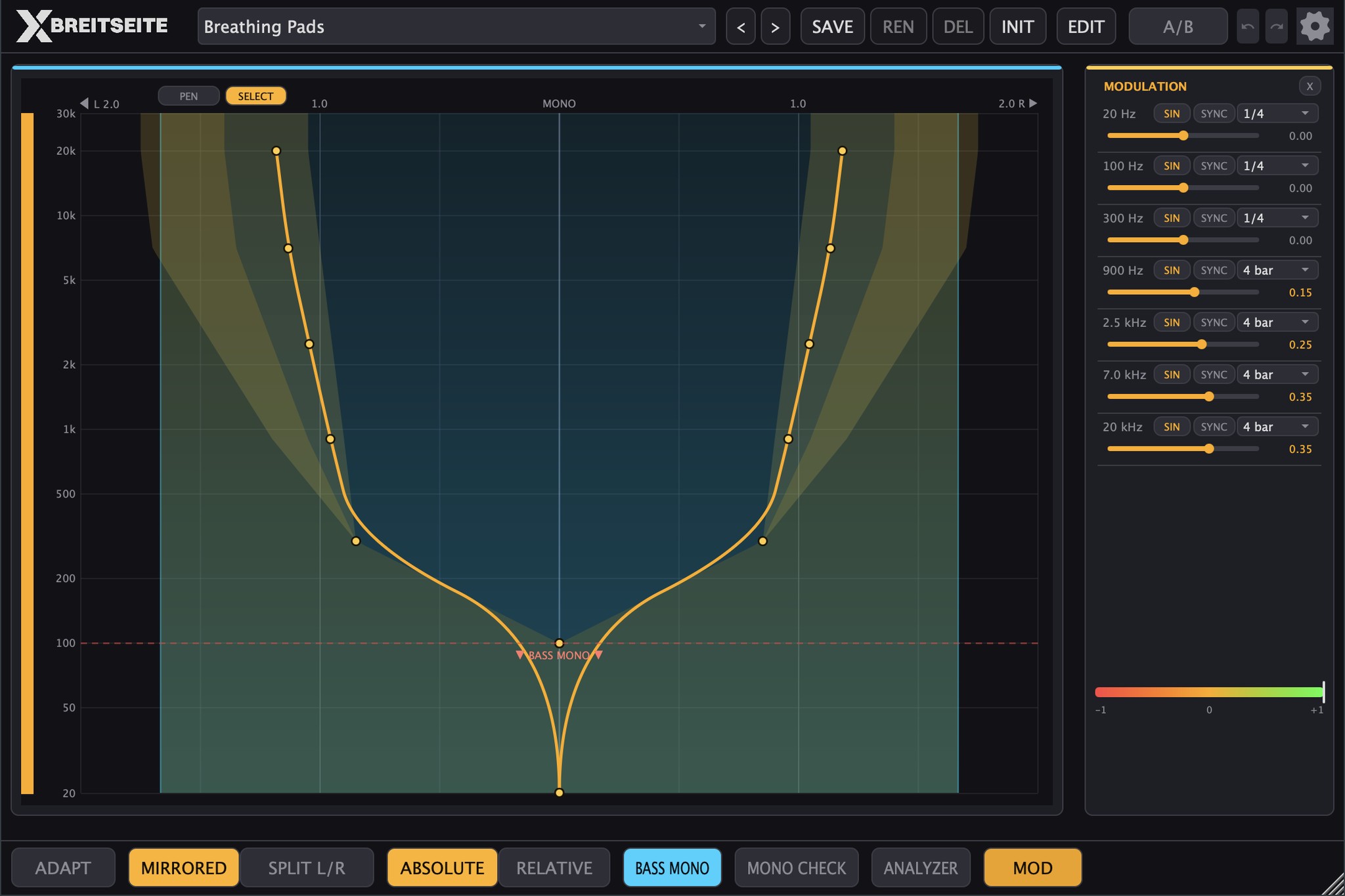
The golden areas show the range each moving point sweeps.
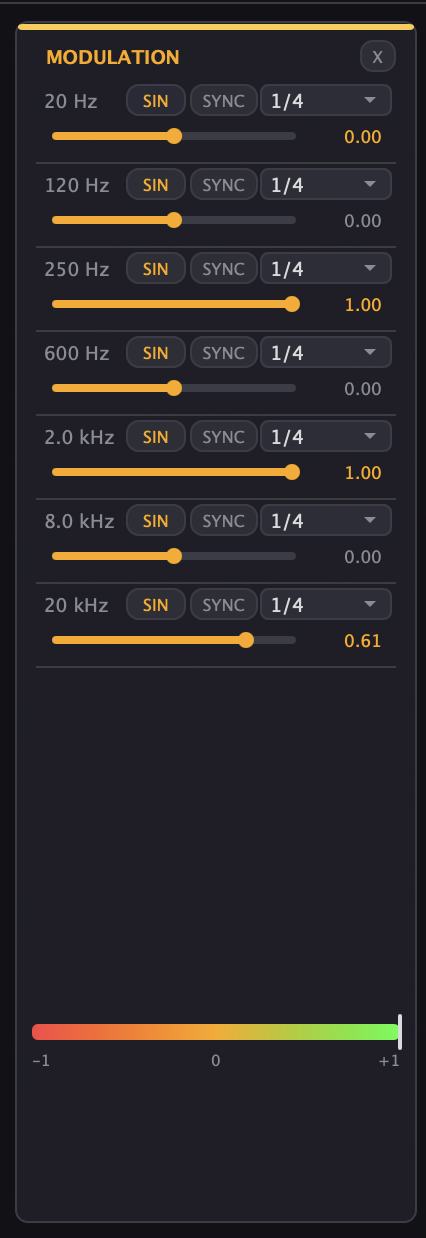
The LFO behind it comes from KA-303 and offers five waveforms: SIN, TRI, SAW, SQR and S&H. In SYNC mode it runs in 14 note values from 4 bars down to 1/32, including triplets and dotted values. In FREE mode it runs from 0.01 to 20 Hz. Up to eight points per side can move, counted from the lowest frequency up.
Depth is measured in width units from -1 to +1: a point at 1.2 with a depth of 0.5 swings between 0.7 and 1.7. Negative depth moves the other way, so two points at +0.5 and -0.5 swing against each other. A gold band in the editor shows the range the movement covers. Below the bass mono boundary, the side content stays removed no matter what.
In SYNC the phase comes from the song position alone, even for the random values of S&H. A bounce therefore sounds exactly like playback. With the transport stopped, the movement keeps running at song tempo so you can hear it while you set it up, and in the standalone app it runs at 120 BPM. FREE, on the other hand, is not reproducible: two bounces of the same passage land at different phases.
Two things we would rather tell you up front. The curve can only change once every 512 samples, which is 94 times per second at 48 kHz. Very fast movement such as 1/32 at 128 BPM therefore sounds stepped, without clicking, while 1/4 up to a full bar flows smoothly. And movement cannot be automated from your DAW, because points come and go while a plugin's parameter list is fixed. It is saved with your project and in your own presets, and points without depth cost no CPU at all.
Bass Mono, MONO CHECK and goniometer
BASS MONO sets the foundation. Below the boundary the side content is removed completely. Above it, the side comes back over a soft 100 Hz ramp instead of a hard edge that would be audible as pre-echo. A red dashed line marks the boundary right in the editor.
The button on the interface switches between 120 Hz and off. The parameter itself covers 0 to 300 Hz, and other boundaries come from presets, Club Safe at 150 Hz and Vinyl Master at 200 Hz, or from your DAW automation.
MONO CHECK folds the output to its mono sum, so both channels get the same signal. The mid keeps its level and only the side disappears: whatever substance goes missing with the check switched on will be missing on the club system too. The check sits after A/B, so you hear the mono sums of original and processed signal against each other, and the switch uses the same 7 ms ramp as A/B, so nothing clicks.
Next to it sits a goniometer that shows the processed signal. A narrow vertical cloud means mono, a round spread means wide and uncorrelated, a horizontal cloud means clearly out of phase. CORRELATION adds the broadband correlation of the input as a bar and a number. That is the view that saves your master before it goes to the pressing plant.
22 factory presets in three categories
The preset bar sits at the top, as in the other Kreuzberg Audio plugins: a menu with the sections MASTER, CREATIVE and BASS, your own presets below under MY PRESETS, browsing with < and >, plus SAVE, REN, DEL and INIT. EDIT opens the full preset editor. Besides the curve, a preset also sets MASTER WIDTH, Bass Mono, SMOOTHING, MIRRORED and RELATIVE.
Seven presets bring movement and show what breathing curve points do in an arrangement. Seven more pull width back on purpose: a frequency-dependent widener can make one band narrower and open up again above it, a broadband one cannot.
- Master (8): Bass Mono > Wide Tops keeps bass and sub mono and opens the top step by step up to 1.6 times the width, the go-to move on the mix bus. Vinyl Master is mono up to 200 Hz and opens carefully above that. Wide Air > 8k widens only the air band above 8 kHz. Club Safe with Bass Mono up to 150 Hz and MASTER WIDTH 0.9, for systems you do not trust. Low-Mid Repair pulls width back between 300 and 700 Hz, where side content costs the most level in the mono sum. Mid Forward narrows the range from 900 Hz to 2.5 kHz so vocals and snare move forward. Air Control keeps the mids wide and pulls the highs back, down to 0.7 at 20 kHz, against overdone stereo air from exciters. Random Air gives the air above 6 kHz a new width on every quarter note, for cymbals and hi-hats that sit frozen in the image.
- Creative (9): Low-Mid Shuffle with mono bass and a wide low-mid range that narrows toward the top. Wide Pads for pads and atmospheres, softly smoothed with MASTER WIDTH 1.2. Peak-Time Wide with strong width across the whole band and MASTER WIDTH 1.3. Breathing Pads lets the upper half breathe over four bars. Counter-Motion moves mids and highs against each other, purely through the sign of the depth. Stutter Wide jumps between narrow and wide on eighth notes, made for build-ups. Hat Drift lets the top range wander outward and back over four bars, with separate curves for left and right. Riser opens with a sawtooth over two bars. Ambient Drift runs free at 0.03 Hz, about 33 seconds per cycle and so longer than any phrase.
- Bass (5): Mono < 120 Hz makes only the bass mono and leaves everything above unchanged. Sub Lock is strictly mono below 80 Hz and fully open right above. 808 Room keeps the fundamental mono up to 60 Hz and opens step by step above it up to 500 Hz, where the character of the 808 sits. Kick & Bass pulls width back around 350 Hz, where bass fundamental and kick overlap. Reese Wide is mono up to 120 Hz and opens around 1.5 kHz up to 1.75 times the width, exactly where the beating of a detuned saw pair sits.
Your own presets are saved as .breitpreset files, with both curves and the movement of every point.
The preset editor
On the left, under LIBRARY, factory and user presets sit side by side, each entry tagged FACTORY or USER, with a filter for CREATIVE, BASS, MASTER and USER. On the right, under EDIT PRESET, you get name, category and an editable table of every node. The table is the precise route to a curve: exact frequencies and widths get typed in here instead of aimed at in the editor.
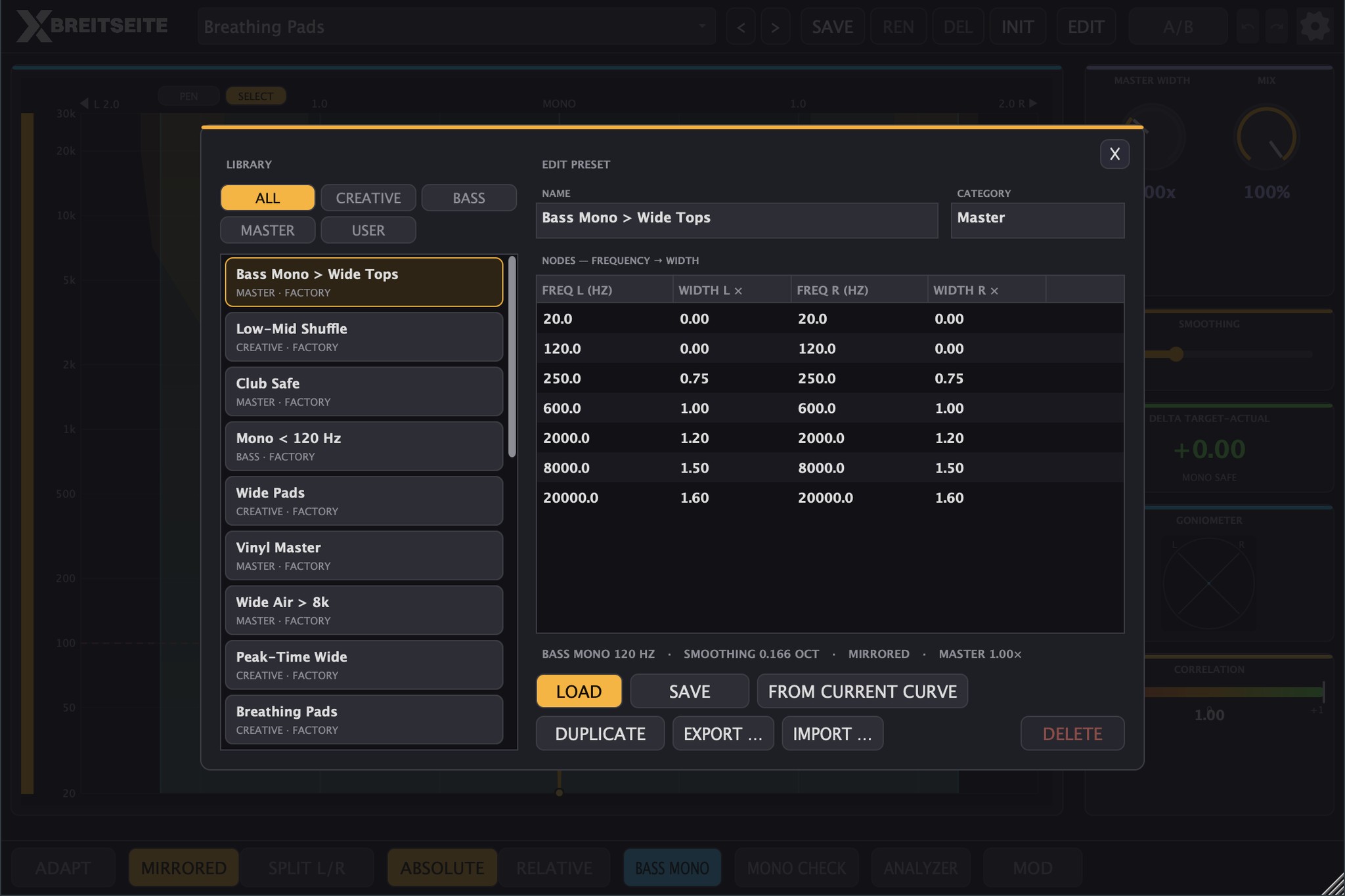
Library on the left, curve points as a table on the right.
Load, save, duplicate, export and import are all there, along with FROM CURRENT CURVE, the direct path from your current state, movement included, to a new preset. Factory presets are compiled into the program and can never get lost.
Technical highlights
- Spectral processing via STFT, window size 2048, hop 512 for 75 percent overlap, 1025 frequency bands, Hann window in analysis and synthesis
- Mid untouched with a mirrored curve, side factor capped at 6x in ABSOLUTE and 9x in RELATIVE, never negative
- Constant Q smoothing of the width curve from 0 to 0.5 octaves, default around one sixth of an octave, curve changes smoothed over 50 ms
- Movement per curve point: up to 8 points per side, 5 waveforms, 14 note values in SYNC, 0.01 to 20 Hz in FREE
- Analyzer on the same grid as the processing, 400 ms averaging below 200 Hz and 200 ms above, per-band and broadband correlation, display at around 60 Hz
- A/B with a 7 ms crossfade and loudness matching up to 12 dB, AUTO GAIN with about 300 ms measurement, 50 ms glide and up to 12 dB
- MIX on a 15 ms ramp, dry path delayed to match and phase coherent
- Eleven automatable parameters, including MONO CHECK
- Processing in sub blocks, stable even at oversized buffer settings during an offline bounce
- Constant latency of 2048 samples, independent of sample rate and reported cleanly to the DAW
- Interface resizable from 810 x 540 to 1920 x 1200 pixels, scale steps at 75, 90, 100, 125 and 150 percent, dark and light theme
- Tested with pluginval at maximum strictness, auval and clap-validator
The 2048 samples of latency are not an oversight, they are the price of the spectral resolution, 42.7 ms at 48 kHz. Your DAW compensates for them, and they never change at runtime, not with MIX at 0 and not with A/B engaged, because a plugin that renegotiates its latency during playback causes dropouts in most hosts. That makes BREITSEITE a tool for mixing and mastering, not for monitoring while tracking.
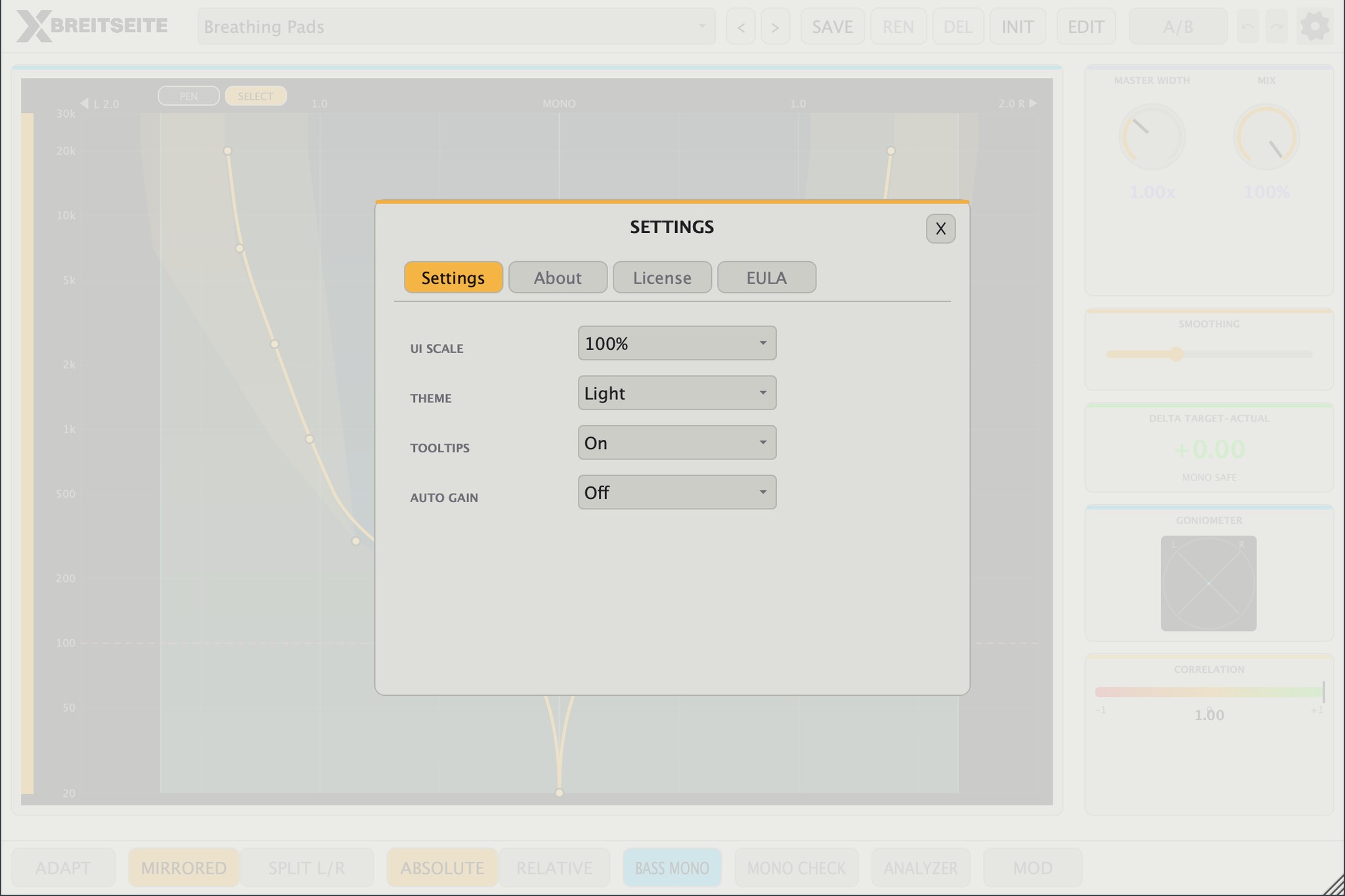
The light theme, switchable in the SETTINGS.
Pro Tools and a time-aligned bypass
BREITSEITE now comes as AAX too, on macOS and on Windows, PACE-signed as Avid requires and filed under Sound Field in Pro Tools. If you move between Pro Tools and a second DAW, you work with the same tool and the same presets in both.
There is also a fix that affects every format. Your DAW's bypass used to pass the signal through undelayed while BREITSEITE kept reporting its 2048 samples of latency: a bypassed track therefore sat almost 43 ms ahead of the mix. BREITSEITE now reports a bypass parameter of its own, crossfades over 7 ms to the latency-delayed original and leaves the level alone. A bypassed track stays in time, and that goes for VST3, AU, CLAP and AAX alike.
Formats & Systems
Formats: VST3, AU (macOS), CLAP, AAX (macOS and Windows), Standalone
Systems:
- macOS 11 Big Sur or newer (Universal Binary, Intel and Apple Silicon)
- Windows 10 and 11 (64-bit)
- Linux x86_64 with glibc 2.35 or newer, roughly Ubuntu 22.04 and up, standalone on ALSA
Stereo to stereo, an effect, not an instrument and no MIDI. Tested at 44.1, 48 and 96 kHz and at buffer sizes from 64 to 2048 samples. Current version 1.0.0 with JUCE 8.0.12.
Made in Berlin
BREITSEITE was developed entirely in Berlin. The DSP runs on JUCE, while the spectral processing, the analyzer, the correlation metering and the per-point movement are written from scratch, with the LFO taken from our own KA-303. The audio path is realtime safe, with no allocations on the audio thread, clean parameter ramps and sub block processing. No white label, no off the shelf imager with a fresh coat of paint.
Tools by producers, for producers.
License and demo
The demo runs with the full feature set. Nothing is locked, movement included. For every 60 seconds of processed audio, BREITSEITE lays a 3 second noise burst over both channels, peaking at around -22.5 dBFS with soft fades in and out. After 29 launches the demo ends, and from the 30th launch on the plugin outputs pure silence until you enter a serial number.
One honest note on that: a launch means a session in which BREITSEITE actually processed audio, charged on the first audio it handles and once per program run. A plugin scan by your DAW costs nothing, and a project with ten instances costs one launch instead of ten. Two DAWs open side by side do cost one launch each.
The license is checked online once, when you enter your serial number. After that BREITSEITE starts without an internet connection. Your serial number allows three simultaneous activations and is tied to the machine it runs on. The only data sent is the serial number, an anonymous hardware fingerprint and the product name, never audio or project data. Updates up to and including version 1.x are free for license holders.
Demo: 0.00 EUR
Full version: 49.00 EUR (incl. 19% VAT)
License Information
This product includes a professional license system with the following features:
- Online activation with hardware fingerprinting
- Up to 3 device activations included
- Automatic license delivery via email
- Customer portal for license management
After purchase, you will receive your license serial number via email within minutes.